Splat Toolkit
A 3D Gaussian splat file is a long list of soft colored blobs, each with a place, a size in three directions, a turn, an opacity and a color (sometimes a color that changes with the viewing angle, called spherical harmonics).
The facts
- Shelf
- Studio
- Kind
- Built from a recipe
- Your own
- Your own splat
- Sound
- Yes
- Licenses
- CC0, CC BY 4.0, MIT, Apache-2.0, BSD
How to play, in the Playground
Tap to spin it round. Open your own splat file in the Splash tab to crop, clean, shrink or convert it.
Its controls
| Control | Kind | Range | Start |
|---|---|---|---|
| Spin it round (both, in step) | Tap | ||
| Spin | Button | ||
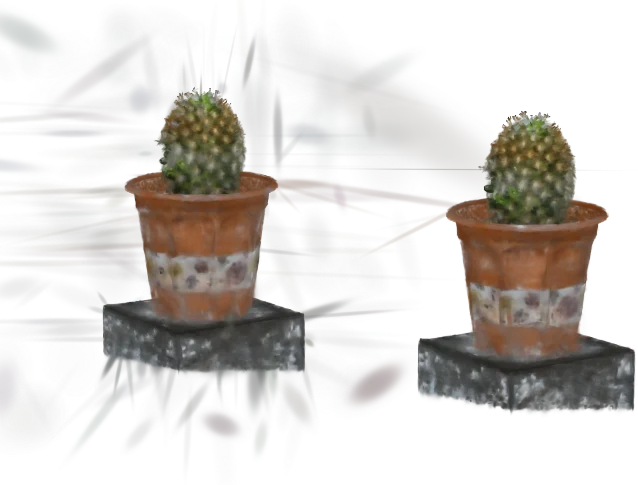
| Splat | List | 6 choices | Cactus with stray splats added (try Remove floaters) |
| Show | List | 3 choices | Before and after, side by side |
| Compare with | List | 7 choices | Nothing (one splat) |
| Turn it upright | List | 3 choices | Automatic (most splat files are stored upside down) |
| Remove floaters | Setting | ||
| Floaters: how far out (lower removes more) | Setting | ||
| Floaters: neighbors to compare with | List | 3 choices | 8 |
| Also remove nearly invisible splats | Setting | ||
| Crop with a box | Setting | ||
| Box: left side | Setting | ||
| Box: right side | Setting | ||
| Box: bottom | Setting | ||
| Box: top | Setting | ||
| Box: back | Setting | ||
| Box: front | Setting | ||
| Box: keep what is outside it | Setting | ||
| Shrink: keep this share of the splats (%) | Setting |
About it
A 3D Gaussian splat file is a long list of soft colored blobs, each with a place, a size in three directions, a turn, an opacity and a color (sometimes a color that changes with the viewing angle, called spherical harmonics). This toolkit opens the common formats (PLY, compressed PLY, .splat, SPZ and SOG) and shows what is inside: how many splats, how big the scene is, the harmonics' degree, and the memory it takes.
Crop keeps what is inside a box. Remove floaters finds the stray blobs a capture leaves in the air: for each splat it measures the average distance to its nearest neighbors, and those much farther out than the rest (a statistical outlier filter) are removed; show them in red, or before and after side by side. Shrink keeps the splats that show most. Save writes the result in the format you choose, and Compare puts a second splat beside the first, turning in step. Everything runs on your device in the background; nothing is uploaded.
Details
- Your own files
- .ply, .splat, .spz, .sog, .json, .webp
Sources and credits
| Work | By | License |
|---|---|---|
| Cactus (3DGS sample data) | steam studio / 3D SCAN STUDIO iris | CC0 1.0 |
| Strawberry | Dany Bittel | CC BY 4.0 |
| Japanese Bee | YUMA Co., Ltd. | CC BY 4.0 |
Libraries
- MIT
- gifenc 1.0.3
- Apache-2.0
- laz-perf 0.0.7 (lane LSTUDIO, copied from Splashery)
- MIT, BSD
- WebP codec (splat-transform, with libwebp)