Definitions, derivations, notes, and long tables start folded.
Chapter 1What a splat is
A splat is a small cloud of color floating in space. Up close, it looks like a soft ellipse, bright in the middle and fading at the edges. On its own, it is nothing much. Put thousands side by side, however, and they melt into surfaces: a torus, a seashell, a cat – practically any object imaginable can be built from splats!

100 splats
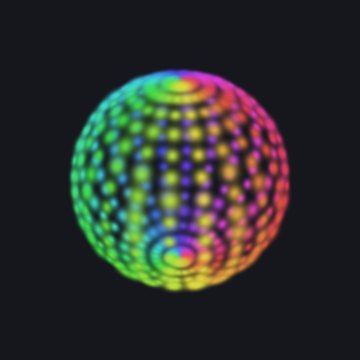
400 splats
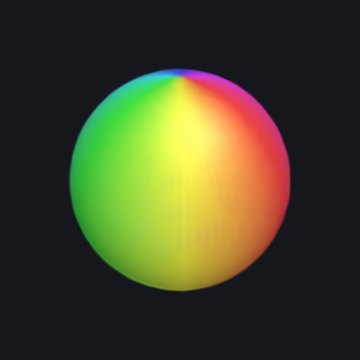
6,000 splats
What is a 3D Gaussian?
Think of a smooth weight field centered at a point μ. Three positive widths and a rotation shape it: the places where the weight is equal form nested ellipsoids. The weight G is 1 at the center and falls off with distance measured in units of those widths. To draw one, the renderer flattens the field into an elliptical patch on the screen, gives it a color, and blends its opacity over the patches behind it. A splat is neither a surface of triangles nor a rigid little ball. Here G peaks at 1, so it is a weight, not a probability density (which would be scaled to add up to 1).
Two terms: weight field and positive widths
A weight field is a number at every point in space: 1 at the center, and falling off the farther you go. The three positive widths are the splat's sizes along its own three axes. They must be above zero, because a width of zero would make the formula below divide by zero.
Three ways splats come to exist (Figure 1):
- A recipe's placed splats. A Splash's recipe places them by rule: points sampled on the shapes of the kit (Splashery's Splash-building library, Chapter 2), each given a size, a rotation, and a color. Nothing is fitted to photos.
-
A trained capture. A splat file made by other software from many photos of a real
thing, then opened here (
.ply,.sog,.splat, or.spz). The page shows these; it does not train them. - The one-photo teaching fit. The Gaussian Splatting Splash fits flat, 2D Gaussians to a single picture by gradient descent. It shows the fitting idea; it is not a 3D reconstruction.
Try it: a 3D Gaussian, from every side
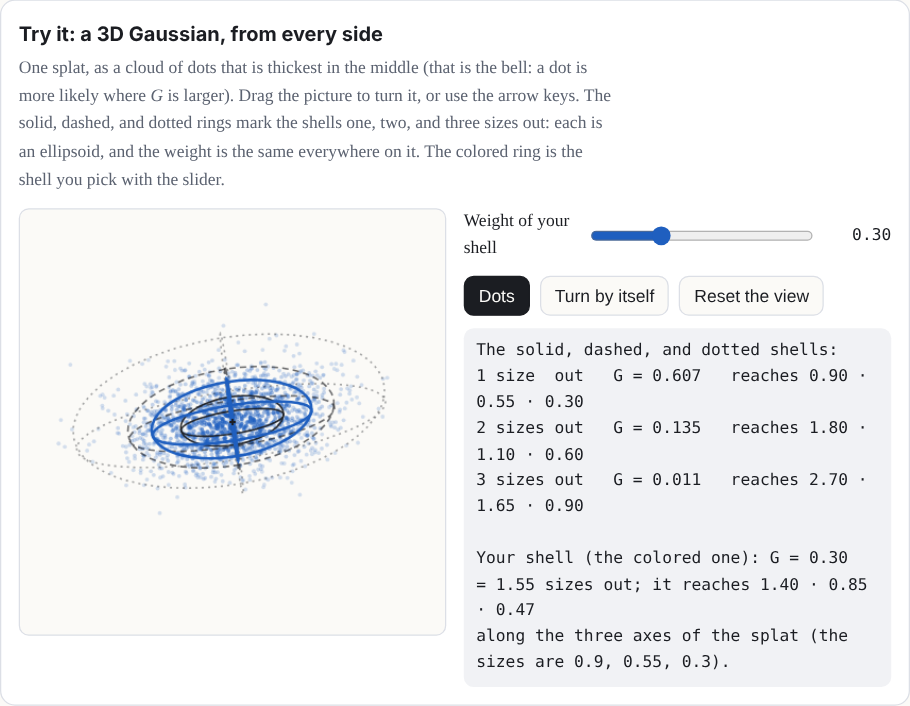
One splat, as a cloud of dots that is thickest in the middle (that is the bell: a dot is more likely where G is larger). Drag the picture to turn it, or use the arrow keys. The solid, dashed, and dotted rings mark the shells one, two, and three sizes out: each is an ellipsoid, and the weight is the same everywhere on it. The colored ring is the shell you pick with the slider.
The numbers in one splat
Each splat is described by a handful of numbers:
| Part | Numbers | What it means |
|---|---|---|
| Center μ | 3: x, y, z | Where the middle of the splat is. |
| Sizes s | 3: s1, s2, s3 | How far it spreads along each of its own three axes. Equal sizes make a ball; one small size makes a flat disc. |
| Rotation q | 4 (a quaternion) | Which way those three axes point. |
| Color | 3: red, green, blue | Each from 0 to 1. |
| Opacity α | 1 | How solid its middle is, from 0 (clear) to 1 (solid). |
Try it: one splat, one control for each number
The splat below is made of exactly the numbers in the table: three for the center, three sizes, a rotation, a color, and an opacity. Move one control and only that number changes (the table marks it). The rotation is given as three turns, one about each axis, because that is friendlier than a quaternion; the table shows the quaternion that the three turns make. The thin rings show the splat's shell one size out, and the colored lines are the x (red), y (green), and z (blue) axes.
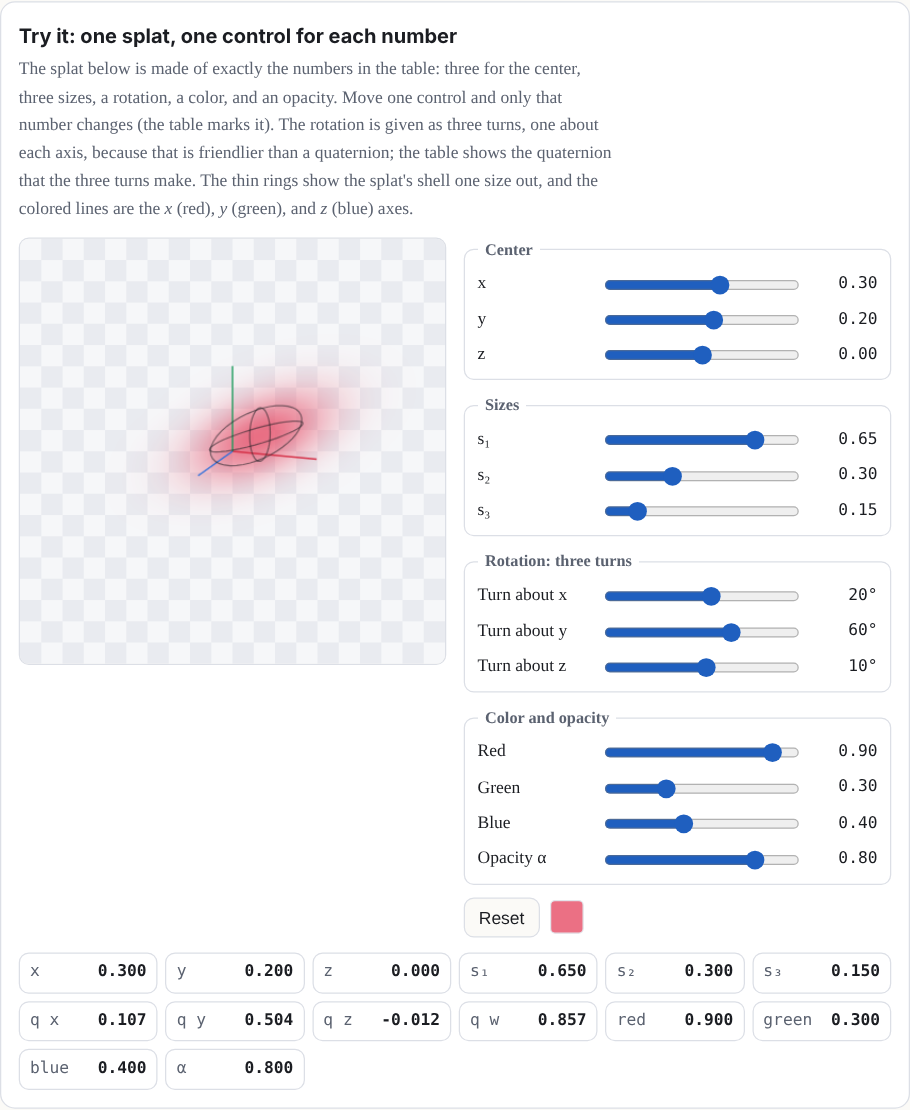
That is 14 numbers per splat. A kit Splash opens at a count set for it at each Detail tier. At Mid that is about 200,000 for most kit Splashes (the Torus, for example, opens at 60,000, 200,000, 240,000, and 340,000 at Low, Mid, High, and Max); Low, High, and Max are set Splash by Splash. The Splats slider changes the count, up to the Splash's own top, which is about 1,000,000 for a kit Splash. Auto picks Low, Mid, or High; Max is a viewer choice. Many splat files also let a splat's color change a little with the direction you look from; the Splashes you build here use one color per splat.
Why these numbers? The splat budgets, and what Auto does
Our choice Nothing in the splat file format or the browser sets these numbers.
Each tier is a splat count that a device of that class can draw smoothly, and each kit
Splash has its own count at each tier. The counts came from a sweep on a computer and were
compared on one phone. Low, Mid, and High are also pixel budgets for the stage, of 0.45,
1.1, and 2.0 million pixels, so a large stage is drawn at a lower ratio than the screen's
own; Max draws at the screen's own pixels, up to a ratio of 3. Auto reads the
device to pick a tier, in this order: Low if the browser draws in software, or the device
reports 2 GB of memory or less, or two cores or fewer; Mid for a phone or tablet (the
browser reports a finger, pointer: coarse, as the main pointer, so a laptop's
touch screen does not count), for modest graphics (an Intel HD or UHD, Mali, Adreno, or
PowerVR chip), 4 GB of memory or less, or four cores or fewer, and for a device that
reports no graphics chip, memory, or cores at all; High for the rest. It never picks Max.
That is a choice you make in Detail, along with High. Auto does not step down by itself.
When the median time of the last 12 frames stays over 45 milliseconds for 3 seconds, the
page offers a toast with a Switch to Low button, once for each Splash, whichever
tier you chose. These thresholds are guesses, not tuned across many real phones. The toast
reads "Running slowly: switch to Low?" and shows once for each Splash in a browser tab's
session, a reload included. A ✕ after its button, labeled Dismiss, closes it; on a touch
screen a sideways swipe of 60 CSS pixels or more slides it away, and a shorter one springs
back; and Escape closes it when no sheet or text field takes the key.
What the measurements say. A measurement compared 14 Splashes on a 390 by 844 phone in a software renderer. A budget of 200,000 splats instead of 140,000 made no Splash sharper, and several shimmered more (the Penguin's shimmer went from 2.72 to 3.90), because each splat got smaller. Lifting the cap on the screen's pixel ratio was the real lever: edges came out about a third narrower, and speckle fell by 10 to 60 percent. For the Splashes measured, more splats help a Splash's shape, not its grain.
Counts and grain. The table's budgets are the two that measurement compared, 140,000 and 200,000. Mid is 200,000 for most kit Splashes. Four Splashes are built so that a bigger count draws finer detail, rather than a grain of fixed resolution. QR Code's sharpness at Mid rises from 0.883 to 0.934 as its count goes from 212,366 to 565,260 splats; Triple QR's goes from 0.789 to 0.986, and its specks fall from 1.9 percent to none; 360° Photo and Song Landscape draw finer rings and slots. For these four, more splats do help the grain.
Show the table: what a bigger budget did
| Splash (home view) | Mid base budget 140,000 splats, 2x phone (the budgets of that measurement) | High base budget 200,000 splats, 2x phone (the budgets of that measurement) | 3x phone, pixel-ratio cap lifted |
|---|---|---|---|
| Desk Lamp | 0.75 · 0.42 · 1.95 | 0.72 · 0.45 · 2.03 | 0.52 · 0.37 · 1.57 |
| Penguin | 0.72 · 0.53 · 2.72 | 0.73 · 0.56 · 3.90 | 0.50 · 0.40 · 2.08 |
| Klein Bottle | 0.84 · 1.19 · 1.42 | 0.81 · 1.00 · 1.75 | 0.53 · 0.77 · 1.13 |
| Marble | 0.81 · 0.69 · 1.13 | 0.78 · 0.83 · 1.41 | 0.55 · 0.48 · 0.87 |
| White Blood Cell | 0.77 · 1.28 · 1.64 | 0.77 · 1.39 · 1.02 | 0.54 · 0.75 · 1.15 |
| Chladni Plate | 0.96 · 3.85 · 9.59 | 0.98 · 5.51 · 10.75 | 0.75 · 1.48 · 5.39 |
Each cell is edge · speckle · shimmer, and lower is better for all three. Edge is how
many screen pixels an edge takes to go from 10 to 90 percent; speckle is the noise over
flat areas; shimmer is how much fine detail flickers frame to frame. Six of the 14
Splashes measured; the rest are in docs/lab/SHARPNESS.md. The splat counts
are base budgets, not counts of splats drawn, and the measurement capped the screen's
pixel ratio at 2 on Mid and High. Splashery caps it at 3, and Low, Mid, and High also
stay within 0.45, 1.1, and 2.0 million pixels.
What it did not test. One pair of budgets (140,000 and 200,000), one phone size, one renderer (software, not a real phone's graphics chip), and the Splashes as they were on that day, before later changes. A larger sweep is in Chapter 2, under How many splats?.
If it were chosen differently. A bigger budget costs memory and drawing time on a
weak device. A smaller one makes shapes coarser. The Splats slider, in Detail and
splats (the stage's Detail and splats button, or More, then Settings), sets the count
directly, up to the Splash's own top (about 1,000,000 for a kit Splash), beside the tiers.
It is there for everyone, not only with labs on. The count goes in a link, as
n=; the Detail tier stays in your browser. While the slider moves, the Splash
previews the share of its splats that the new count would keep, and the build follows when
the slider rests.
Where it lives: each kit Splash's counts in src/ui/toy-counts.js; Auto and
the pixel budgets in src/lib/detail.js; the slow-frames toast in
src/stage.js (stage.watch); the counts and how they were
measured in docs/engine/SPLAT-COUNTS.md; the measurement above in
docs/lab/SHARPNESS.md.
Why this number? One color per splat
Our choice A captured file can carry more; the kit does not.
A captured file can store how each splat's color changes with the direction you look from (spherical harmonics), because training sees every splat from many angles. A kit splat is placed by a recipe, so there are no photos to learn that change from. The kit keeps one color per splat, and the harmonics of a trained file are dropped when it is used as a kit part.
If it were chosen differently. A recipe can already fake two such looks:
glint brightens a splat as the camera moves, and rim changes
glass's opacity with the view. A real shine that moves with the view exists as a labs
experiment, on only when a link or the address asks for it with labs on
(docs/lab/GLOSS.md). It uses the kit's own data and shader, with no change to
the engine. Real-phone checks are still open.
Where it lives: src/packs/fidelity.js (its opening comment),
src/kit.js, and the effect list in src/effects.js.
The Gaussian: a bell in three dimensions
The "Gaussian" in Gaussian splat is the bell curve, named after the mathematician Carl Friedrich Gauss. In one data dimension, a bell centered at μ with width σ (sigma, the standard deviation) is
G(x) = exp(−(x − μ)² / 2σ²)
The data here are one-dimensional: one number, x, goes in, and one number, G, comes out. The drawing below needs two dimensions to show them, one for x and one for G.
In three dimensions, the width becomes a 3-by-3 matrix Σ (capital sigma), called the covariance [4], and the squared distance becomes a quadratic form. For a point p in space, the splat's strength there is
G(p) = exp(−½ (p − μ)T Σ−1 (p − μ))
Where G is the same value, you are on the same "shell" around the center, and those shells are ellipsoids: stretched and turned spheres.
Try it: the bell, one dimension at a time
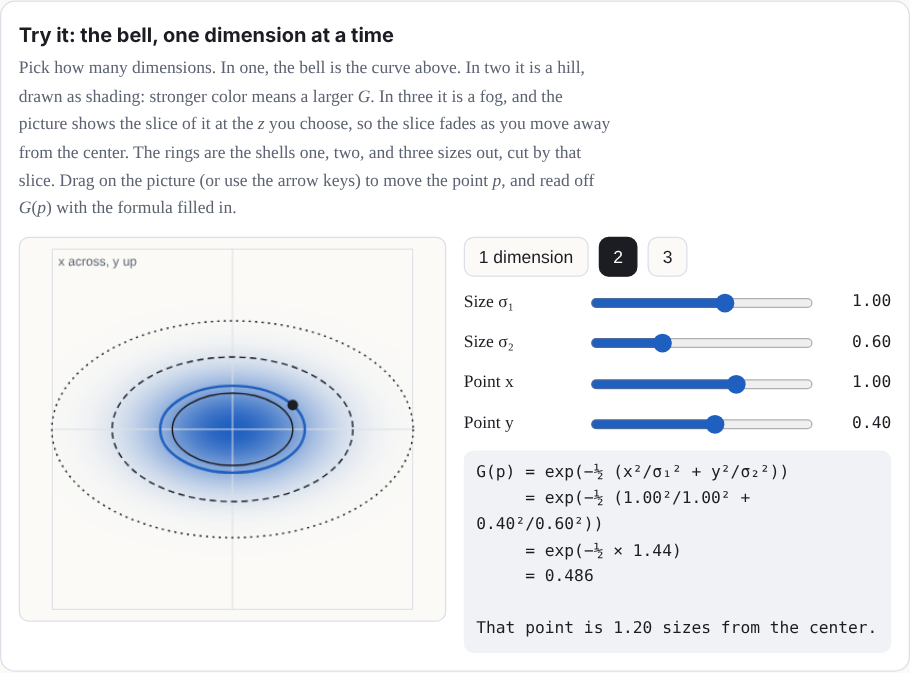
Pick how many dimensions. In one, the bell is the curve above. In two it is a hill, drawn as shading: stronger color means a larger G. In three it is a fog, and the picture shows the slice of it at the z you choose, so the slice fades as you move away from the center. The rings are the shells one, two, and three sizes out, cut by that slice. Drag on the picture (or use the arrow keys) to move the point p, and read off G(p) with the formula filled in.
Two words in that formula: the inverse and the quadratic form
The inverse Σ−1 is the matrix that undoes Σ. And a quadratic form is an expression where every term has two factors of the input, like ad1² + 2bd1d2 + cd2². In two dimensions, with d = (d1, d2) = p − μ, and Σ−1 with 4 and 1 on its diagonal (and zeros elsewhere), the form dT Σ−1 d is 4d1² + d2². Setting it equal to 1 draws an ellipse that reaches ½ along the first axis and 1 along the second. A quadratic form is what turns a point's offset from the center into one number for how far out it is, measured in the splat's own widths. In three dimensions, the same idea draws an ellipsoid [5].
Approximation: the drawn bell is finite. The ideal G never reaches zero. The site's renderer draws each splat on a rectangle that reaches 2√2 sizes along each axis of its ellipse (a little under 3), where G has fallen to e−4, about 0.02, and a faint splat's rectangle stops sooner, where its opacity times G falls to 1/255. The falloff is not rescaled: it stops at the rectangle's edge, and a pixel left with less than 1/255 of opacity is dropped. A labs-only setting can swap in a sharper falloff for one Splash. So the equations here describe the ideal splat, and the screen shows a close, cut-off copy of it.
The covariance, built from sizes and a rotation
Not every 3-by-3 matrix is a valid covariance. It has to be symmetric, and it has to be positive definite (the bell must fall off in every direction). Instead of picking its nine numbers directly, a splat builds it from its three sizes and its rotation:
Σ = R S ST RT, where S = s1000s2000s3
and R is the rotation matrix of the quaternion q. Read it right to left, as a recipe for a shape: start with a round ball of size 1, stretch it by s1, s2, and s3 along x, y, and z, then turn it by R. Any sizes above zero and any rotation give a valid covariance, which is exactly what you want when a computer is nudging millions of numbers.
Try it: a covariance from two sizes and a turn, or typed
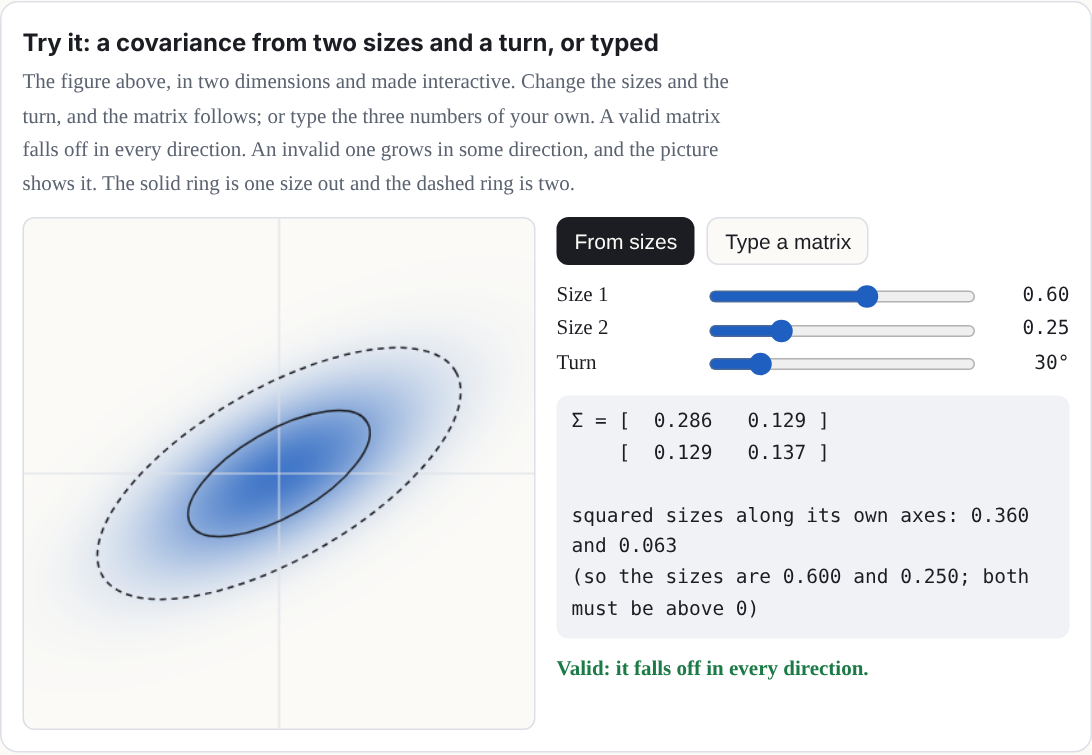
The figure above, in two dimensions and made interactive. Change the sizes and the turn, and the matrix follows; or type the three numbers of your own. A valid matrix falls off in every direction. An invalid one grows in some direction, and the picture shows it. The solid ring is one size out and the dashed ring is two.
A worked example: a covariance from sizes 0.3, 0.1, and 0.1
Take sizes 0.3, 0.1 and 0.1, turned 30° about the z axis. Then SST has 0.09, 0.01, and 0.01 on its diagonal, and multiplying out R SST RT gives
Σ ≈ 0.0700.03500.0350.0300000.010
The top-left number is 0.09 cos²30° + 0.01 sin²30° = 0.07, and the ones beside it are (0.09 − 0.01) sin 30° cos 30° ≈ 0.035. Those off-diagonal numbers are the tilt: they are zero when the splat's axes line up with x, y, and z, and usually not zero when they do not. (Usually, because a splat that is round in a plane has no preferred axes there, so turning it within that plane changes nothing.) (In this manual, rotation means a splat's own turn, and "Tilt lock" is the name of the camera control in Chapter 5.)
From 3D to the screen
To draw a splat, the renderer works out what its bell looks like from the camera. It first turns the covariance into the camera's view, with the camera's rotation W. The perspective of a camera is not a straight-line map, but close to one point it nearly is, and its best straight-line stand-in there is a matrix J (the Jacobian of the projection). Such a stand-in is called affine: a straight-line map plus a shift [6]. Then the splat's covariance on the screen is
Σ′ = J W Σ WT JT
keeping only its top-left 2-by-2 block. That 2-by-2 matrix is a flat bell on the screen: an ellipse. Its eigenvectors are the directions of the ellipse's axes, and the square roots of its eigenvalues are how far it spreads along them. This trick comes from EWA splatting (Zwicker, Pfister, van Baar, and Gross, 2001) [2].
That is the first-order footprint, and a real renderer draws a little more than it. To keep
a tiny splat from shrinking to less than a pixel (and flickering), splat renderers add a
small blur on the screen: the original 3D Gaussian splatting code adds 0.3 square pixels to
each diagonal entry of the 2-by-2 matrix. Splashery draws with its own WebGL2 renderer,
which always adds 0.075 square pixels to both diagonal entries (a quarter as much, counted
in whole pixels; some renderers count in half pixels, where the same amount reads 0.3), and
keeps the smaller eigenvalue at least 0.025. It also
culls a splat whose larger variance comes out
under 0.125 square pixels, too small to see (the cull is in src/gl/shaders.js).
A splat half a pixel across, for example, spreads 2π(0.25 + 0.075) = 2.04 square pixels of
opacity (2.01 measured), so it does not vanish. These numbers grow with the picture: when
Save image draws at 2× or 4× the stage's size, each one is scaled to match. Some renderers
also have an anti-aliasing option that lowers
each splat's opacity to make up for the energy that blur spreads out, using the ratio of the
determinants before and after; Splashery
adds no such compensation. So the demo below shows Σ′ itself, the unfiltered geometry; the
pixels on your screen have that extra blur on top.
Try it: one ellipsoid, and a camera you can move
The solid line is the true outline on the screen of the shell one size out of a splat, found by sending points of the shell through the real perspective map. The dashed line is the ellipse that the formula gives (the renderer adds a small blur of 0.075 square pixels to this, which the demo leaves out), from Σ′ = J W Σ WT JT. Turn the camera and the splat, and change its distance: far away the two lines are one line. Bring the camera in and they part, because J is exact only at the center. (The zoom grows with the distance, so the splat stays about the same size on screen and the only thing that changes is how much perspective bends it.)
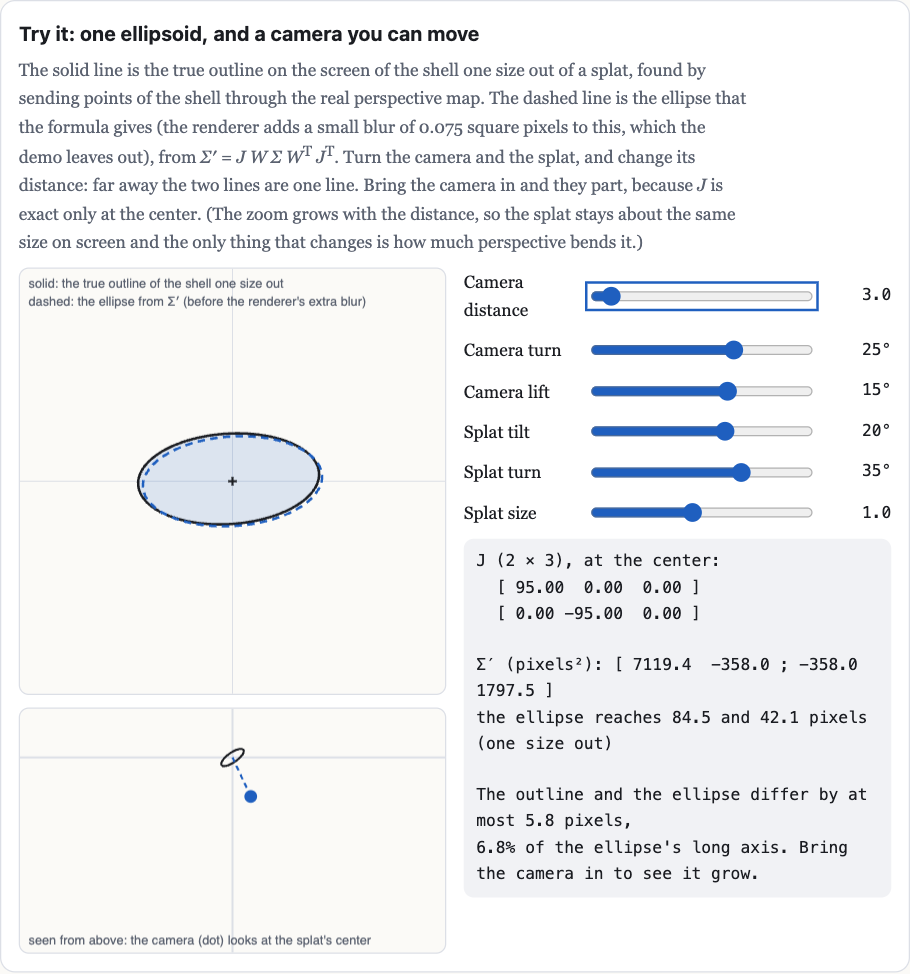
Approximation: affine around the center. An affine map is a straight-line map plus a shift. J is exact only at the splat's center, where the straight-line stand-in touches the true perspective map. Across the rest of the splat the real map bends away from it, so the ellipse is the first-order answer, not an exact image of the 3D bell.
Sorting and blending, back to front
Splats are see-through at their edges, so the order they are drawn in matters. The splats are sorted by their centers' depth along the camera's view, and painted from the farthest to the nearest. At each pixel, a splat's strength there is its opacity times its bell, a = α G′, and it is laid over what is already there:
C ← a c + (1 − a) C
where c is the splat's color and C the pixel's color so far. Written out for all the splats at once, counting from the nearest (i = 1) to the farthest, the pixel's color over a black background is
C = Σi ci ai Πj < i (1 − aj)
Each splat shows as much as the splats in front of it let through. This "over" operation is from computer graphics' classic paper on compositing [3]. It is how the 2023 paper that started the craze, "3D Gaussian Splatting for Real-Time Radiance Field Rendering" (Kerbl, Kopanas, Leimkühler, and Drettakis) [1], draws its scenes, and it is how Splashery blends its splats (the cover lists the exceptions).
Try it: four splats, painted in an order you choose
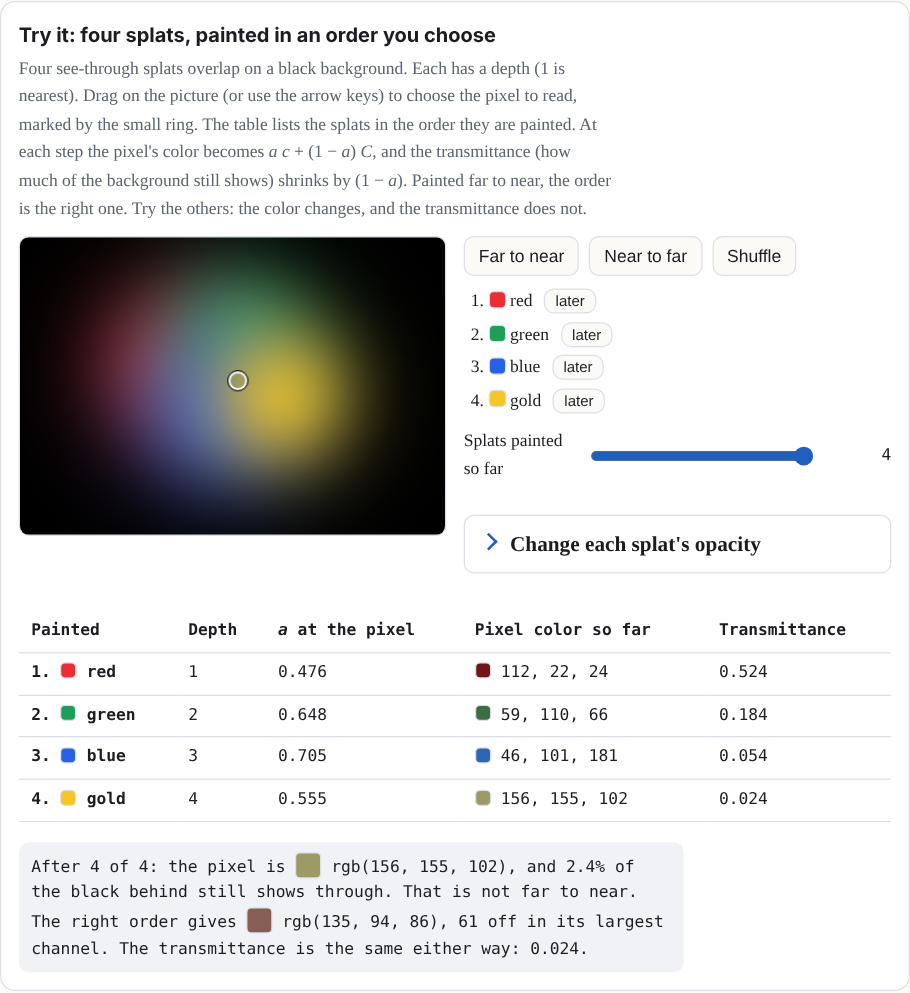
Four see-through splats overlap on a black background. Each has a depth (1 is nearest). Drag on the picture (or use the arrow keys) to choose the pixel to read, marked by the small ring. The table lists the splats in the order they are painted. At each step the pixel's color becomes a c + (1 − a) C, and the transmittance (how much of the background still shows) shrinks by (1 − a). Painted far to near, the order is the right one. Try the others: the color changes, and the transmittance does not.
Change each splat's opacity
| Painted | Depth | a at the pixel | Pixel color so far | Transmittance |
|---|
Why the order matters in the Splashes. By default, Splashery sorts the splats in
the pose a Splash was built in, so a piece that moves keeps the order it had at rest. A
recipe can request out.resortPose to sort moving parts and pages in their
current pose. Turn a solid thing more than a quarter turn and its far side can be drawn
over its near side. The Splashes work around it: Splat Equation, for one, builds its shape
at twelve moments and morphs from the copy at the start of the current interval to the
next (Chapter 3).
A worked example of blending, with a background
Take one color channel. The background is 0.2. The far splat (drawn first) has color 0.9 and strength a = 0.5 at this pixel. The near splat (drawn second) has color 0.1 and a = 0.4. After the far splat: C = 0.5 × 0.9 + 0.5 × 0.2 = 0.55. After the near one: C = 0.4 × 0.1 + 0.6 × 0.55 = 0.37. The same number comes from the sum above with the background added: 0.1 × 0.4 + 0.9 × 0.5 × 0.6 + 0.2 × 0.6 × 0.5 = 0.37. The share of the background that still shows, the transmittance, is 0.6 × 0.5 = 0.3.
One caution about the numbers. 0.37 is the arithmetic of one channel in one consistent blending space: the formula does not care what the 0 to 1 numbers mean, as long as every number in the sum uses the same meaning. A screen's red, green, and blue numbers are usually encoded (squeezed so that dark shades get more steps), and blending encoded numbers is not the same as blending the light itself. So read 0.37 as the result of the sum, not as a measured amount of light and not as the final pixel on any particular screen.
Approximation: sorting uses centers. Each splat gets one depth, the depth of its center, so the order is per splat, not per pixel. Two big splats that overlap in depth can be drawn in the wrong order where they cross. This is why recipe authors keep layers apart (the recipe guide says splats "sort by their centers, so closer layers mix in stripes").